


Last updated: June 30, 2026 · By: Tim Morris, founder of ForexMT4Indicators.com
Forex order types tell your broker how and when to enter or exit a trade. A market order fills now at the current price. A limit order waits for a better price; a stop order waits for a worse price to confirm momentum; a stop-limit pairs a trigger with a price cap you choose.
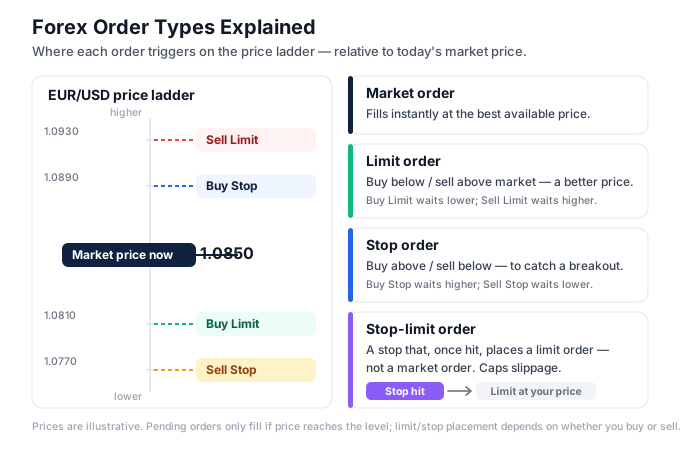
The diagram above is a price ladder showing where each order sits relative to the live market: buy limits and sell stops below price, sell limits and buy stops above it, market orders filling instantly in the middle. Get these four building blocks right and every entry, stop loss, and take profit you ever place becomes a deliberate decision instead of a guess. If you are still finding your feet, our step-by-step guide for beginners walks through everything that comes before your first order.
Table of contents
- What are forex order types?
- Why order types matter for your account
- The two ways every order behaves
- Market orders
- Limit orders
- Stop orders
- Stop-limit orders
- How to choose the right order type
- Order types on XAU/USD (gold)
- Common mistakes
- Limit vs stop orders compared
- Frequently asked questions
What are forex order types?
An order type is the instruction set you hand your broker when you want to buy or sell. It answers two questions: at what price should this trade execute, and should it execute immediately or only when a condition is met.
There are two families. Market orders execute right now at whatever price is available. Pending orders — limit, stop, and stop-limit — sit dormant until price reaches a level you specify, then convert into live trades.
Every retail platform, MetaTrader 4 and MetaTrader 5 included, is built on these same primitives. The names rarely change between brokers; what changes is the slippage, the spread, and the execution speed behind them.
Stop loss and take profit are not separate order types. A stop loss is a stop order attached to an open position; a take profit is a limit order attached to one. Understanding the four base types means you already understand every protective order on the platform.
Why order types matter for your account
The order type you pick decides your entry price, and your entry price decides your risk. A market order during a fast move can fill 5-10 pips away from where you clicked; a limit order fills at your number or not at all. That gap is real money.
Order types also decide whether you have to sit at the screen. Pending orders let you pre-place an entry above a breakout level or below a pullback zone, then walk away while the broker watches the level around the clock.
For prop firm traders the choice is sharper still. A poorly chosen market order that slips through a daily-loss limit can fail a challenge in one click. Pending orders with attached stops fix your risk before the trade opens, which is what challenge rules reward.
The two ways every order behaves
Before the four names, learn the two behaviours. Every pending order sits either above or below the current market, and once you internalise the logic the names stop being memorisation.
Limit logic: wait for a better price
A limit order asks for a price more favourable than the current one. A buy limit sits below market because buying lower is better; a sell limit sits above market because selling higher is better. You are betting that price pulls back to you before continuing.
Stop logic: wait for confirmation
A stop order asks for a price less favourable than the current one. A buy stop sits above market; a sell stop sits below it. You are betting on momentum — that a break of a level confirms the move is real, and you want in only after it proves itself.
This is the single distinction most beginners miss. Limit orders buy weakness and sell strength; stop orders buy strength and sell weakness. Neither is better — they suit different setups, which the long versus short decision and your strategy should drive.
Market orders
A market order is an instruction to buy or sell immediately at the best available price. It is the fastest order type and the only one guaranteed to execute, but it does not guarantee the price you saw when you clicked.
The cost you pay on entry is the spread — the gap between the bid (sell) price and the ask (buy) price. A buy market order fills at the ask; a sell market order fills at the bid. On EUR/USD that spread is often under 1 pip; on exotics and gold it is wider.
In fast markets your fill can differ from your expected price. That difference is slippage, and it runs both ways — sometimes worse, occasionally better. During news spikes like NFP or CPI, slippage on a market order can reach $1 to $3 on gold — 100 to 300 pips.
Use market orders when execution certainty matters more than a perfect price — closing a losing trade fast, or exiting before a known news release. Avoid them in thin liquidity, where the spread alone can swallow a tight stop.
Limit orders
A limit order executes only at your specified price or better. It is the order type for patience — you have identified a level where you want in, and you let price come to you rather than chasing it.
A buy limit is placed below the current market. You use it to buy a pullback into support, expecting price to dip, fill your order, then resume higher. If price never returns to your level, the order never fills and you risk nothing.
A sell limit is placed above the current market. You use it to sell into resistance, expecting price to push up into your level and reverse. Limit orders pair naturally with support and resistance zones, where price reactions are most likely.
The trade-off is opportunity cost: a better price but no guarantee of a fill, since price can reverse one pip short of your level and run without you. A take profit is a limit order in disguise — it closes your winner at a price better than the current market.
Stop orders
A stop order executes once price reaches your trigger, then fills at the next available market price. It is the momentum order — and the engine behind every stop loss on the platform.
A buy stop sits above the current market. Breakout traders use it to enter long only after price breaks resistance, confirming the move before committing capital. A sell stop sits below the market, used to enter short on a confirmed break of support.
A stop order does not guarantee your trigger price. Once triggered it becomes a market order, so the actual fill can slip — especially during fast breakouts or news. This is why stop losses on volatile instruments sometimes fill worse than the level you set.
The protective stop loss is the most important order you will ever place — a sell stop below a long entry, or a buy stop above a short entry, that caps your loss automatically. Sizing that stop correctly is what the risk-reward calculator and a clear stop distance are for.
Stop-limit orders
A stop-limit order combines two prices: a stop (trigger) price that activates the order, and a limit price that caps how far the fill can travel. When price hits the trigger, the order becomes a limit order rather than a market order.
This solves the slippage problem of a plain stop. With a buy stop-limit, you might trigger at 1.0850 but refuse to pay more than 1.0855 — if price gaps past 1.0855, the order waits instead of filling at a bad price. You trade fill certainty for price certainty.
The risk is the mirror image: in a fast market your trigger fires but price blows through your limit, and you get no fill at all. On a protective stop, no fill means an open losing position with no exit — a meaningful danger during gold news spikes or weekend gaps.
Use stop-limits when controlling your exact price matters more than guaranteeing execution — a breakout on a liquid major where you refuse to overpay. Avoid them as protective stop losses on volatile instruments, where a missed fill leaves you exposed. MT5 supports stop-limit orders natively; MT4 does not offer a true buy/sell stop-limit, so plan around that if you trade MT4.
How to choose the right order type
Match the order to the job, not the habit. Most blown accounts come from using a market order everywhere because it is the default button.
Need to execute right now? Use a market order. Closing a runaway loss or entering a move already underway both demand speed over price.
Want to buy a pullback or sell a rally? Use a limit order. Buy limit below price into support, sell limit above price into resistance.
Want to trade a breakout with confirmation? Use a stop order. Buy stop above resistance, sell stop below support — you enter only after the level breaks.
Want breakout entry without overpaying? Use a stop-limit, accepting that price may run without you. Best on liquid majors, not on news or thin sessions.
Protecting an open trade? A stop loss (stop order) caps the downside; a take profit (limit order) locks the upside. Set both before you walk away.
Order types on XAU/USD (gold)
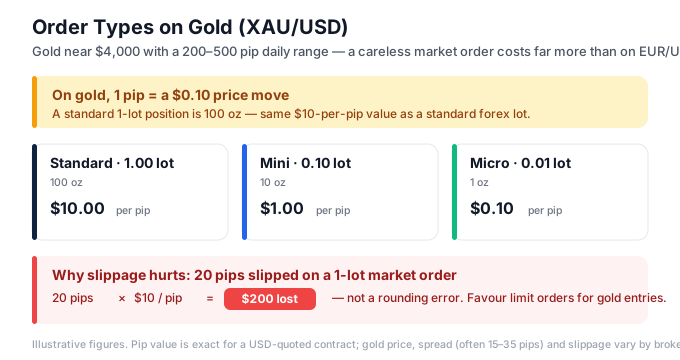
Order types behave the same on gold mechanically, but gold’s volatility changes how you use them. With XAU/USD trading near $4,000 in 2026 and a daily range of $20 to $50 (about 2,000 to 5,000 pips), the cost of a careless market order is far higher than on EUR/USD.
On gold, 1 pip is a $0.01 price move, and a standard 1-lot position (100 oz) is worth $1 per pip. A mini 0.10 lot is $0.10 per pip; a micro 0.01 lot is $0.01 per pip. A $2 slip — 200 pips — on a 1-lot gold market order during CPI costs $200, not a rounding error.
Two adjustments follow. Favour limit orders over market orders for gold entries, because gold’s wider spread (often 15-35 pips on retail brokers) punishes every market fill. And avoid stop-limit protective stops on gold — one that misses its fill during an NFP spike leaves a 0.10-lot position bleeding at $0.10 per pip with no exit while gold runs hundreds of pips.
Size from the math, not the gut: 1% risk on a $5,000 account is $50, and a 2,000-pip gold stop — a $20 price move — at $0.01 per pip (0.01 lot) already risks $20 of that. Size down, never up, when the stop is wide.
Common mistakes traders make with order types
Using a market order for every entry. The default button slips during news and pays full spread every time. Fix: use limit orders for planned pullback and rally entries; reserve market orders for moments that need speed.
Confusing buy limit with buy stop. Placing a buy stop where you meant a buy limit makes the platform reject the order or fill it on the wrong side of price. Fix: remember limits sit on the favourable side (buy below, sell above); stops sit on the unfavourable side.
Treating a stop-limit as a safe stop loss. On volatile instruments a stop-limit can fail to fill, leaving your loss uncapped. Fix: use a plain stop order for protective stops; save stop-limits for entries where price precision matters more than certainty.
Setting limit entries too tight to a zone. Price reverses one pip short of an over-precise limit and runs without you. Fix: place the limit inside the support and resistance zone, not at its exact edge, and accept the slightly worse average price.
Forgetting attached orders survive overnight. A pending order left active can trigger during a weekend gap or a news spike you did not plan for. Fix: review and cancel stale pending orders before high-impact releases, and remember overnight positions pay or earn swap, tripled on Wednesday.
Ignoring margin on pending orders. When a pending order fills it consumes margin like any trade — at 1:100 leverage a $100,000 position needs $1,000 margin (1%); at 1:500 it needs $200 (0.2%). Fix: confirm free margin covers every pending order that could fill at once.
Limit vs stop orders compared
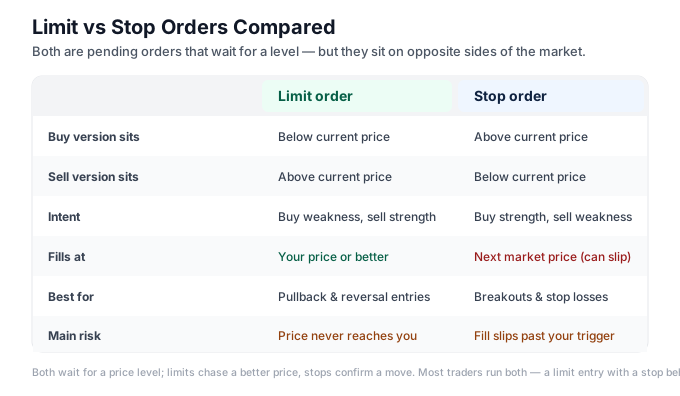
Limit and stop orders are the pair traders mix up most. Both are pending orders, both wait for a price level, but they sit on opposite sides of the market and express opposite intentions.
| Limit order | Stop order | |
|---|---|---|
| Buy version sits | Below current price | Above current price |
| Sell version sits | Above current price | Below current price |
| Intent | Buy weakness, sell strength | Buy strength, sell weakness |
| Fills at | Your price or better | Next market price (can slip) |
| Best for | Pullback and reversal entries | Breakout entries and stop losses |
| Main risk | Price never reaches you | Fill slips past your trigger |
Use a limit when you believe price will return to a level before continuing. Use a stop when you want confirmation that a level has broken before you commit — the logic of every breakout strategy. In practice most traders run both at once: a limit order for the planned entry and a stop order as the protective stop loss behind it.
Frequently asked questions
What is the difference between a limit order and a stop order?
A limit order buys below or sells above the current price to get a better fill, and only executes at your price or better. A stop order buys above or sells below the current price to confirm momentum, and fills at the next available market price once triggered — which means it can slip. Limits chase a better price; stops confirm a move.
Does a stop order guarantee my price?
No. A stop order guarantees execution once price hits your trigger, but it then fills at the next available market price, so the actual fill can be worse during fast moves or news. If you need price certainty, a stop-limit caps the fill — but it risks not filling at all. For protective stop losses on volatile pairs, a plain stop is safer than a stop-limit.
What order type should I use on gold (XAU/USD)?
Favour limit orders for gold entries because gold’s wide spread (15-35 pips) makes every market fill costly. Use plain stop orders for protective stops, not stop-limits, since a missed fill during an NFP or CPI spike can leave a position uncapped. With gold near $4,000 and a $20 to $50 daily range (about 2,000 to 5,000 pips), size positions down and confirm the math before entering.
Can I use stop-limit orders on MT4?
MT4 does not offer a true buy stop-limit or sell stop-limit order — its pending types are buy/sell limit and buy/sell stop only. MT5 added native stop-limit orders. If you trade MT4 and need price-capped breakout entries, you have to manage that manually or upgrade to MT5, where the stop-limit ticket is built in.
What is the difference between a stop loss and a stop order?
A stop order is the order type; a stop loss is one use of it. A stop loss is a stop order attached to an open position that closes the trade automatically at a set level to cap your loss. Every stop loss is a stop order, but not every stop order is a stop loss — a buy stop above resistance is a breakout entry, for example.
Why did my limit order not fill?
A limit order only fills at your price or better, so if price reversed before reaching your level, it never triggered. Price can come within a single pip of a limit and run the other way. Placing limits inside a zone rather than at its exact edge, instead of demanding a perfect price, reduces how often you get left behind.
Glossary of related terms
- Market order — an instruction to buy or sell immediately at the best available price.
- Buy/sell limit — a pending order on the favourable side: buy below price, sell above it.
- Buy/sell stop — a pending order on the unfavourable side: buy above price, sell below it.
- Stop-limit — a stop trigger that converts into a limit order, capping the fill price.
- Stop loss (SL) — a stop order attached to a position to cap loss automatically.
- Take profit (TP) — a limit order attached to a position to lock profit automatically.
- Slippage — the gap between expected and actual fill price. how slippage works in forex
- OCO (One-Cancels-Other) — two pending orders linked so filling one cancels the other.
Related reading
Risk disclaimer: Forex and CFD trading carries a high level of risk and may not be suitable for all traders. The strategies and indicators described in this article are educational. Past performance does not guarantee future results. Always test on a demo account before risking real capital.
Ready to put this into practice?
Open an account with a regulated broker and apply what you have learned. These are the three brokers we recommend:
Trading forex and CFDs carries a significant risk of loss and is not suitable for everyone. Broker links are affiliate links — we may earn a commission at no cost to you.